JG
TinyTales
Helping Parents Discover Stories That Matter

Prologue
TinyTales was created as a design sprint project to show how, in a short timeframe, new ideas can be generated through rapid product exploration and brainstorming. I was in charge of all aspects of the project including mapping, sketching, storyboarding, prototyping, and testing.
The app is designed for tablet devices, helping parents discover the best stories and books to read with their young children. Both browsing and reading ebooks happen within the application making it easy to find the perfect story and spend more time enjoying storytime together.
The Plot
TinyTales hosts a growing library of children’s stories, with authors and illustrators contributing everything from short stories and picture books to educational tales. As the collection expanded parents began sharing a common challenge: finding the right story for storytime can be time-consuming and overwhelming.
The goal of TinyTales is simple, make discovering the perfect story quick and easy, so parents can spend less time searching and more time reading with their children.

Chapter One: Mapping the Story
I began the design sprint by diving into the user research provided, which included interview recordings, key quotes, and detailed user personas. After carefully reviewing and organizing this information, I began charting possible end-to-end experiences that a parent might have while using TinyTales. These maps helped visualize the user journey and laid the foundation for the rest of the design process.

After creating four maps, I analyzed each one to identify which would best support a seamless story selection process for TinyTales users. By carefully referring back to the user research and weighing each option, I determined that the map below offered the most effective path for helping parents quickly find the perfect story.

Chapter Two: Research & Rough Drafts
Exploring the Library
Day Two began with secondary research. I conducted lightning demos, exploring how competitors approached challenges similar to TinyTales. My first deep dive was into Scholastic, one of the largest publishers and distributors of children’s books. Examining their online store provided valuable inspiration, particularly in how well-designed filters and browsing tools can make discovering content easier and more intuitive for users.

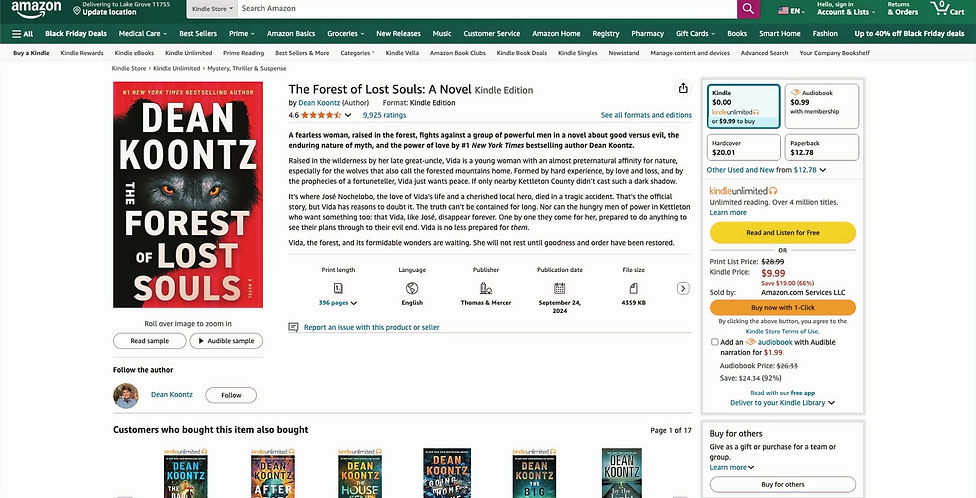
Another competitor I analyzed was Amazon, whose user interface is less intuitive but still offered valuable insights. One pain point identified by TinyTales users was the difficulty of finding stories of the right length. Amazon addresses this by displaying helpful details on each book’s page such as page count, language, and other quick-reference icons. This approach inspired the design of TinyTales’ story pages ensuring parents could easily see key information at a glance.
Illustrating the Tale
After completing secondary research I moved on to sketching, using the Crazy 8s method which is a rapid exercise that challenges designers to create eight distinct ideas in eight minutes. I started by focusing on the most critical screen: the home screen. This decision made sense because it’s the central hub where parents explore TinyTales’ extensive library, making it the key gateway to discovering the perfect story.

Once the Crazy 8 sketches were complete I reviewed them to select the design direction to move forward with. The chosen idea was then developed into a solution sketch, which functions like a mini storyboard. It maps out the key flow, including the screen that comes before the critical screen, the critical screen itself, and the screen that follows. For TinyTales, this included the login page, the home screen, and a specific story page, capturing the core experience of discovering and reading a story.

Chapter Three: Mapping the Story
On the third day of the design sprint I focused on creating a virtual storyboard to guide the development of the prototype on Day Four. The storyboard didn’t capture every possible interaction in TinyTales; instead, it concentrated on the key steps a parent would take to find the ideal story to read. Building this storyboard helped me better understand the user’s journey and identify opportunities for improvement based on the sketches from the previous day.
1.

-
Users are required to login when opening the application in order to prevent young children from accessing the application without a parent's permission
2.

-
The homepage features popular stories and suggestions based off of a user's activity
-
Categories are listed on the left-hand side
-
Filtering options are available to give users the ability to filter content based on popular, new, etc.
3.

-
Selecting a category from the left-hand side allows users to see stories featuring a specific topic their children are interested in
4.

-
Viewing a story allows users to learn more about it through a written description
-
Reviews from other users allow parents to get a better understanding of whether or not the story is right for their children
Chapter Four: Building the Tale
One of the biggest challenges of the design sprint came on Day Four: prototyping. With user testing scheduled for the following day, it was time to bring the designs to life. As the sole designer on the project I was responsible for crafting each page in detail, which required balancing speed with careful attention to usability.
Because children might use TinyTales without parental supervision I focused on keeping the interface straightforward and intuitive. This included adding clear labels to buttons, making all options immediately visible rather than hidden in menus, and incorporating a password prompt before a story could be accessed. These decisions helped ensure a safe and simple reading experience for both parents and children.

Login Page

Homepage

Animals Category

Book

Story With Password Pop-Up
Chapter Five: Revising the Pages
The design sprint concluded on Day Five with user testing and design updates. The day began with five interviews, with participants ranging from ages twenty-seven to thirty-nine. All were parents who incorporated reading into their nightly routines.
Notable results from the tests:
-
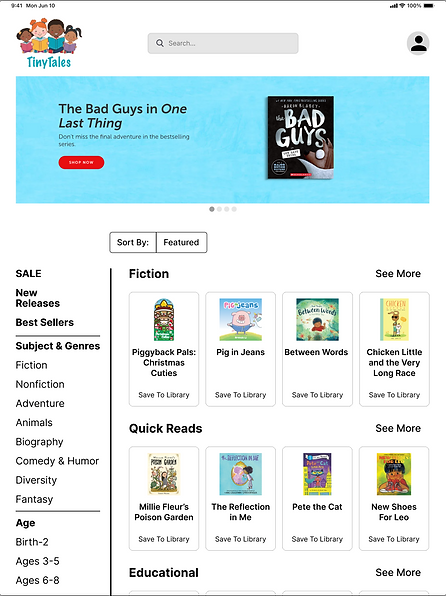
All users wanted bigger book covers and titles
-
Two users found the carousel banner to be unnecessary on the animals category page
-
Three users mentioned that the best sellers and subject & genres items in the categories column were lacking separation
Once testing was complete, the results were carefully analyzed and used to inform updates to the current designs.
-
Increased size of story covers and titles
-
Added boxes around each story
-
Added lines to categories column
-
Increased size of profile icon

-
Added option to remove viewing of animals category
-
Increased size of story covers and titles
-
Added boxes around each story
-
Added lines to categories column
-
Increased size of profile icon

-
Increased text size under star ratings
-
Added back button
-
Adjusted spacing between sections
-
Increased sizes of profile pictures in reviews section
Epilogue: Lessons from the Tale
TinyTales was the first time I had the opportunity to participate in a design sprint. Before TinyTales, the projects I completed spanned much longer timelines. Yet in just five days, I moved from research to high-fidelity mockups that met the project’s goals.
Like with all design projects, challenges arose, particularly in recruiting interview participants. By Day Three, I had five participants, but two canceled on Day Four. Through persistence, I secured replacements just in time for testing.
Not every moment was a challenge. Secondary research on Day Two provided inspiration from competitors, and the Crazy 8s sketching exercise strengthened my ability to generate ideas quickly, showing that the first sketches are often just the start of the optimal design.
Overall, the TinyTales sprint was a valuable opportunity to grow and refine my skills. It reinforced the importance of rapid iteration, user-centered thinking, and creative problem-solving, and I look forward to future design sprints where I can continue crafting meaningful user experiences.
